 3DMinesweeper.com
What the first reveal guarantees
In Standard, you can start on any tile. The first tile you reveal is safe. Later in the game, you may reach a position where the available clues leave two possible mine layouts.
In No Guessing, the board marks your starting tile. The game tests the layout from that tile and accepts it only if its solver can deduce a way to reveal every safe tile.
What a 50/50 looks like
Suppose A and B are the last two covered tiles. One mine remains. Every revealed clue that counts either tile counts both, so the mine can sit in either place and the clues stay the same.
| Layout | Tile A | Tile B |
|---|---|---|
| 1 | Mine | Safe |
| 2 | Safe | Mine |
That’s a forced guess. When a position only looks like a 50/50 in 3D, check the layers above and below it in Inspect view. A clue there might count just one of the two tiles and settle the move.
Watch a cube get solved
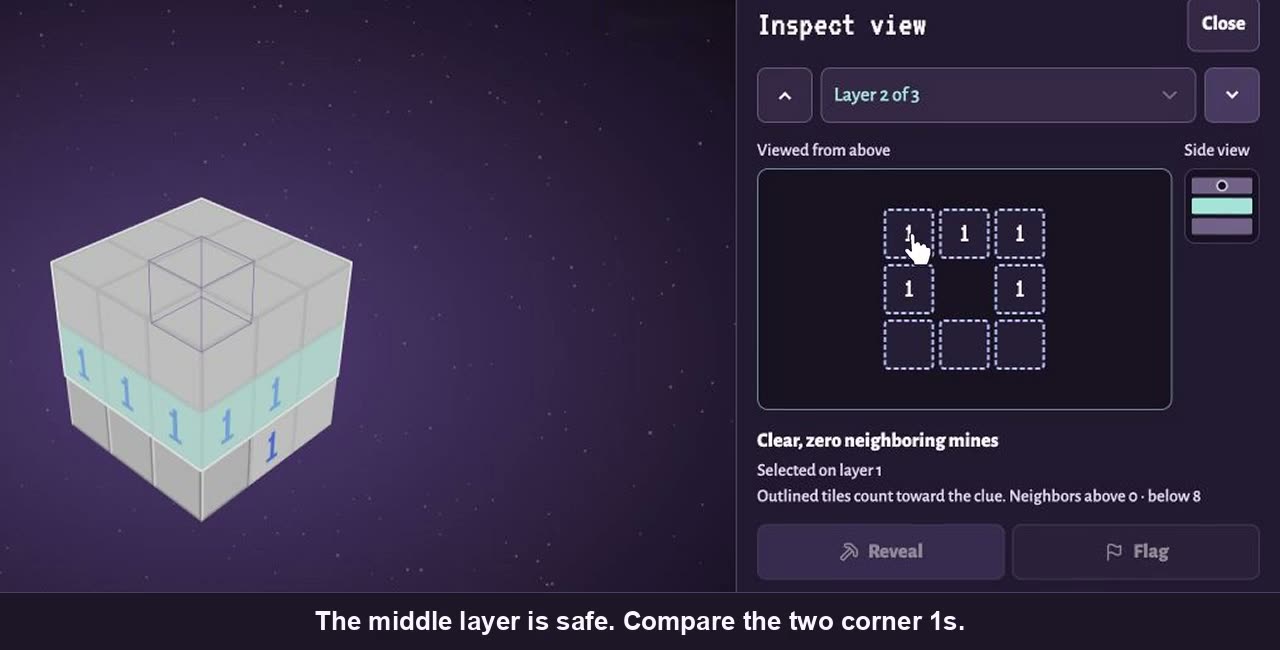
This run starts on a marked tile and ends with every safe tile revealed. The decisive move comes from two 1 clues on the middle layer of a cube with one mine.
- Reveal the marked tile. It opens a blank, so none of its neighbors hold a mine.
- Open Inspect and study the two corner 1s on the middle layer. The left clue counts the left and center columns below it. The right clue counts the center and right columns.
- Switch to the bottom layer. The middle tile in the top row is the only covered tile counted by both clues. Since there’s only one mine on the whole cube, flag that tile.
- Select the 1 just beneath the flag in the grid and choose Reveal. Its mine is already flagged, so Reveal opens the last two safe neighbors together.
Try No Guessing
From the board selector, choose No Guessing, then start with the Easy Cube. Reveal the marked tile. When you get stuck, choose a clue in Inspect view and follow its outline through the layers before making your next move.
If a custom board can’t be generated, try another size or lower the mine percentage. For controls and the rules of play, see How to play 3D Minesweeper.
Start on the marked tile, then use Inspect to check a clue against the layer below it.
Play the No Guessing Easy Cube